New clinic software usually succeeds or fails at the front desk, not in the doctor’s chamber. If the receptionist finds registration slower than the old register, or the nurse cannot find where vitals go, paper quietly comes back within a month. This post sets out a practical, role-by-role training plan for small and mid-sized clinics, and how to keep the new system in use after the first week.
Why Adoption Fails at the Front Desk
Front-desk and nursing staff carry the busiest parts of the day: the morning rush, phones ringing, patients asking how long the wait is. Any new step that slows them down feels like a risk. Common reasons rollouts stall:
- staff were shown every feature in one long session and remembered none of it;
- nobody decided which paper forms stop on which day, so both systems run in parallel;
- there is no one to ask when something goes wrong mid-shift;
- staff worry that mistakes will be blamed on them, or that the software is there to replace them.
Each of these is a planning problem, and each has a fix. Our post on lessons from clinics that went digital covers the wider decisions; this one focuses on the people.
Before Training: Decide the Workflow and Pick Champions
Do not train on the software in the abstract. First write down, on one page, how a patient moves through your clinic in the new system: who registers them, who records vitals, where the doctor writes the prescription, who bills and who books the follow-up. Training then becomes "this is your part of the journey". Our walkthrough of the patient journey in a digital clinic can help with this step.
Then pick one or two champions: staff who are comfortable with phones and computers and respected by colleagues. Train them first and more deeply, and make them the first point of help on the floor. Champions are usually more effective than any manual, because they speak the clinic’s language and are there during the rush.
Also set up user accounts properly before day one. Each person should log in as themselves with the access their role needs, not share a single password. Our post on roles and permissions explains why.
Train by Role, Not by Feature
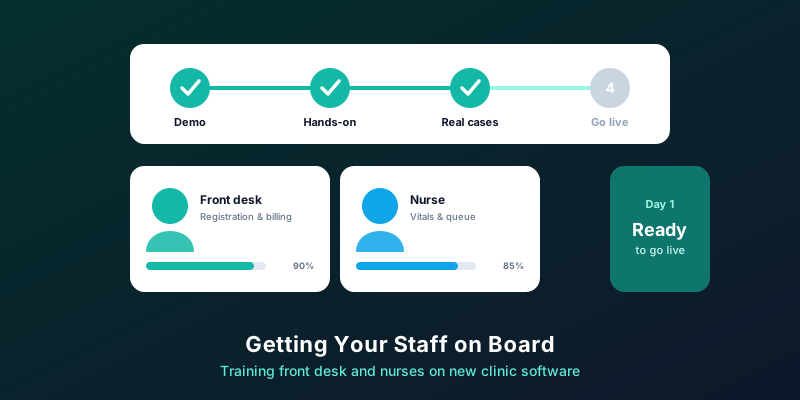
Front desk
- Registering a new patient and finding an existing one quickly.
- Booking, rescheduling and cancelling appointments; issuing tokens for walk-ins.
- Billing and taking payment, if the front desk handles it.
- What to do when a patient refuses to share a detail, and how to explain the consent notice.
Nurses and assistants
- Recording vitals against the right visit.
- Attaching reports and documents the patient brings.
- Seeing the queue and moving patients through it.
Doctors
- Reading history at a glance, writing notes and prescriptions, setting follow-ups.
- Saving personal templates for the cases they see most often.
Keep each session short, around 30 to 45 minutes, on the actual screens staff will use, with practice on test patients. Practise the hard cases too: a patient with the same name as another, a walk-in during a full schedule, a bill that needs correcting.
A Two-Week Rollout Plan
- Days 1 to 3: champions trained in depth; clinic settings, services, fees and user accounts set up.
- Days 4 to 6: role-based sessions for everyone, followed by practice on test patients during quiet hours.
- Day 7: go live in a lighter session first, such as an evening or a Saturday, rather than the busiest morning.
- Days 8 to 10: full go-live. Champions on the floor, doctors patient with small delays, and a short huddle at the end of each day to collect problems.
- Days 11 to 14: fix the top issues, retrain where needed, and retire the paper forms you agreed to retire.
Clinics differ, so stretch or compress this to suit your size. For a sense of how quickly the technical setup can go, see how long it takes to see your first patient digitally.
Handling Resistance and Mistakes
- Say why. Explain what gets easier for them: fewer phone reminders to make, no hunting for files, fewer billing disputes.
- Address job worries directly. In most small clinics, software removes repetitive tasks; it does not remove the need for people who know the patients.
- Make mistakes safe. Early errors are expected. Fix them together and look for the pattern, rather than blaming the person.
- Lead from the chamber. If the doctor keeps writing on paper, staff will too. The owner using the system visibly matters more than any instruction.
- Watch for workarounds. A notebook kept "just in case" is a sign that a step is too slow or unclear. Find out which one.
Keeping It Going After Go-Live
- A one-page guide per role, kept at the desk, written by the champions in plain language.
- Onboarding for new joiners: a session with a champion before their first unsupervised shift.
- Monthly ten-minute refreshers on one feature that is under-used.
- Simple checks: are follow-up dates being entered, are bills matching visits, are vitals recorded? Monthly reports show where habits are slipping.
MedHive Pro supports this kind of rollout with separate roles for doctors and receptionists, a receptionist dashboard, personalised doctor dashboards and staff attendance, so each person sees the screens their job needs. See MedHive Pro for an overview.
Frequently Asked Questions
What if a staff member is not comfortable with computers?
Start them on one task they do every day, pair them with a champion, and add tasks once that one feels routine. Confidence grows faster from a few tasks done well than from many done nervously.
Should we run paper and software side by side?
Briefly, if at all, and with a fixed end date. Running both indefinitely doubles the work and keeps paper as the real record. See building a paperless clinic.
How do we know training has worked?
After a month, check whether registrations, vitals, prescriptions and bills are all being recorded in the system for most visits. If one step lags, that is where to retrain.
Software Your Front Desk Will Actually Use
See MedHive Pro’s receptionist and doctor screens for yourself in a short demo.